Best TENS Units in 2026: 5 Picks for Pain Relief
2026 buying guide · TENS machines for temporary pain relief
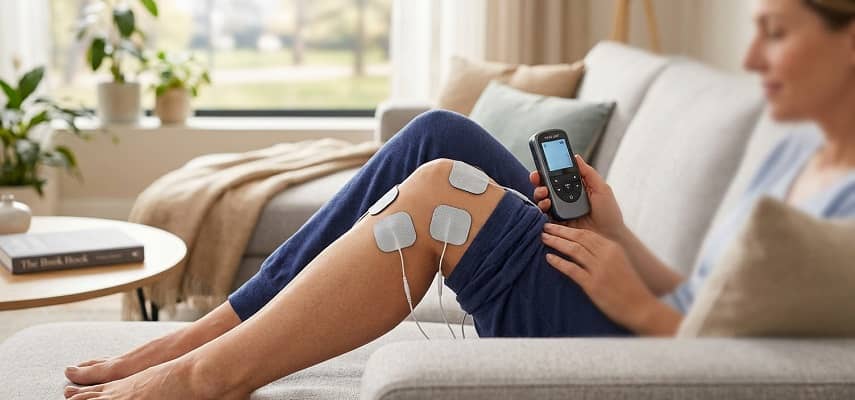
A TENS unit sends mild electrical pulses through adhesive electrodes on the skin and may provide temporary pain relief for some people. For most buyers who want adjustable wired control, our best all-rounder is the TENS 7000 Rechargeable. This guide compares five distinct options and explains what matters more than a long list of preset modes.
Quick TENS unit picks
Best overall
TENS 7000 Rechargeable
Dual-channel wired control, five adjustable TENS modes, rechargeable power and widely available 2.0 mm pigtail-style pads.
Budget shortlist
AUVON 24 Modes
A compact rechargeable option with 24 presets, 20 intensity levels and a generous starter pad set.
Simple controls
OMRON PM500
Single-channel operation, a clear screen, nine preset patterns and 15 intensity levels without app setup.
JUMP TO A SECTION
How we chose these TENS units
We treated this as a desk-research buying guide, not a hands-on test. We checked current manufacturer specifications, manuals and U.S. Amazon product pages, then selected models that solve different buyer problems: manual customization, low-cost rechargeable use, straightforward controls, on-screen guidance and wireless portability.
We prioritized channel control, intensity adjustment, power source, timer flexibility, electrode compatibility, replacement-pad practicality and clarity of the safety instructions. We did not rank products by Amazon star ratings or review counts because those figures change frequently and are not a substitute for product suitability.
Important: “More modes” does not automatically mean a better TENS unit. A device that is easy to place, comfortable to adjust and compatible with replacement electrodes may be more useful than one with dozens of patterns you never use.
Best TENS units at a glance
| TENS unit | Our category | Controls | Power | Approx. price band* | Before you buy |
|---|---|---|---|---|---|
| TENS 7000 Rechargeable | Best overall | 2 channels; 5 modes; adjustable pulse settings | Rechargeable; USB-C | About $50–$65 | Best if you are comfortable with manual-style controls |
| AUVON 24 Modes | Budget shortlist | 24 presets; 20 intensity levels | Rechargeable | About $20–$35 | Preset-heavy interface; confirm exact seller/package |
| OMRON PM500 | Simple controls | 9 patterns; 15 intensity levels; single channel | 2 AAA batteries | About $40–$80 | Uses OMRON-specific compatible pad system |
| Beurer EM44 | Best guided display | 15 programs; dual-channel intensity; customizable programs | 3 AAA batteries | About $45–$60 | Package descriptions can differ by seller |
| Comfytemp Wireless | Best wireless | 2 independent hosts; up to 30 app modes; 20 levels | Rechargeable | About $35–$45 | App adds features; wireless pads cost more to replace |
TENS is not the same as EMS. TENS is used for pain modulation through sensory stimulation. EMS/NMES is intended to stimulate muscle contraction. Some consumer devices combine both functions, but this article ranks products primarily for their TENS controls and usability.
The five TENS unit profiles
01 / BEST OVERALL
TENS 7000 Rechargeable TENS Unit
The TENS 7000 Rechargeable is our best all-rounder for buyers who want a traditional wired TENS machine with more control than a preset-only pocket unit. It has two channels for up to four electrodes, five stimulation modes, adjustable treatment timing and a rechargeable battery. Its standard 2.0 mm pigtail-style leads also make replacement-pad shopping relatively straightforward.
Key features
- Two channels supporting up to four electrodes
- Five TENS modes with adjustable pulse duration and rate
- Rechargeable lithium-ion battery with USB-C charging
- Adjustable 10–90 minute timer
- 2.0 mm pigtail-style electrode connection
- Belt clip and hard storage case included by the manufacturer
Pros
- Independent two-channel setup is useful when treating two electrode pairs
- Rechargeable power avoids disposable battery changes
- Standard-style connectors make compatible pads easier to source
Cons
- More manual adjustment than beginners may want
- Wired leads are less convenient under clothing than a wireless unit
- High available output means careful, gradual intensity adjustment matters
Best for: Buyers who want rechargeable power plus adjustable, conventional TENS controls.
Who it is not for: Someone who wants one-button presets, an app-controlled wearable, or a device that eliminates lead wires.
02 / BUDGET SHORTLIST
AUVON 24 Modes Rechargeable TENS Unit
The AUVON B06ZZ19MS3 model is a compact rechargeable option for buyers who prefer presets over manual pulse programming. Its current documentation describes 24 mode choices under six main patterns, 20 intensity levels and a starter set of eight electrode pads. It is a practical budget shortlist choice, but seller availability can vary, so verify the exact package on Amazon.
Key features
- 24 preset mode choices
- 20 intensity levels
- Rechargeable battery
- Eight electrode pads in the referenced Amazon package
- Compact handheld controller
- Common 2 mm pigtail-style replacement pads are widely sold
Pros
- Lower-cost way to try a rechargeable TENS machine
- Many preset patterns without manual frequency setup
- Starter package includes several pads
Cons
- Twenty-four presets can be more choice than some users need
- The manufacturer storefront may show different stock status than Amazon sellers
- Less direct pulse-parameter control than the TENS 7000
Best for: Price-conscious buyers who want rechargeable power and easy preset selection.
Who it is not for: People who specifically want independent manual control of pulse frequency and width.
03 / SIMPLE CONTROLS
OMRON Max Power Relief TENS Unit PM500
The OMRON PM500 is a sensible choice when you would rather select a body area or massage-like pattern than manage technical pulse settings. It is a single-channel unit with six body-area modes, three massage-like modes, 15 intensity levels and a clear LCD. Sessions are intentionally simple and use OMRON’s proprietary Long Life Pad system.
Key features
- Six body-area modes plus three massage-like modes
- 15 intensity levels
- Single-channel output with one pair of pads
- Easy-to-read LCD and belt clip
- 15-minute maximum programmed therapy duration
- Powered by two AAA batteries
Pros
- Simple interface with fewer decisions
- Large display compared with very small pocket units
- Manufacturer provides clear pad-placement guidance and replacement pads
Cons
- Single channel limits simultaneous pad arrangements
- Not rechargeable
- Replacement pads are from OMRON’s compatible pad family rather than generic 2 mm pigtail pads
Best for: Beginners who value readable controls and clearly labeled preset choices.
Who it is not for: Buyers who want two independently adjustable channels, rechargeable power or extensive manual customization.
04 / BEST GUIDED DISPLAY
Beurer EM44 Digital TENS Device
The Beurer EM44 stands out for buyers who want more guidance on the device itself. Its display provides electrode-position prompts, and the manual describes 15 programs with independent intensity control for two channels; programs 13–15 can be personalized. It runs on three AAA batteries and offers more setup control than a basic preset-only pocket unit.
Key features
- 15 TENS programs
- Programs 13–15 allow parameter customization
- Dual-channel intensity adjustment
- On-screen electrode-position guidance
- Up to 50 intensity steps in the current Amazon listing
- Three AAA batteries
Pros
- Display helps with initial placement orientation
- Independent channel intensity adds flexibility
- Customizable programs suit users who want more control later
Cons
- More buttons and program choices create a learning curve
- Uses disposable AAA batteries rather than USB charging
- Manufacturer and marketplace package descriptions can differ on included electrode count
Package check: Beurer’s own shop and marketplace listings have described different electrode quantities or packaging. Buy by the exact EM44 model and verify what is included in the seller’s current package rather than assuming every bundle is identical.
Best for: Buyers who want a screen-based placement aid plus room to customize settings.
Who it is not for: Someone who wants the fewest possible settings or rechargeable power.
05 / BEST WIRELESS
Comfytemp Wireless TENS Unit, 2-Pack
The Comfytemp wireless two-host system is the most distinct option here: no lead wires run from a handheld controller to the pads. Each rechargeable host attaches directly to its electrode assembly, while the app opens up to 30 modes and 20 intensity levels. Basic button control is also available, making it less dependent on the phone than an app-only design.
Key features
- Two independent wireless hosts
- Up to 30 modes through the Comfytemp app
- 20 intensity levels
- Rechargeable wireless modules
- Four pads in the referenced two-host package
- On-device controls for basic operation without the app
Pros
- No dangling lead wires between the controller and pads
- Two hosts can cover separate areas independently
- App interface makes a large mode library easier to navigate
Cons
- Wireless replacement pads are more model-specific than generic pigtail pads
- Full feature access depends on a compatible phone and app
- Two rechargeable hosts mean more components to keep charged
Best for: People who value wire-free movement and do not mind using an app for advanced settings.
Who it is not for: Buyers who want universally interchangeable wired pads or prefer a fully offline, single-controller setup.
What should you look for in a TENS unit?
The best TENS unit is not necessarily the strongest or the one with the most modes. Start with how you will actually use it: one pain area or two, wired or wireless, simple presets or manual control, rechargeable or replaceable batteries, and how easy it will be to buy compatible replacement electrodes later.
1. One channel or two independent channels?
A single-channel unit usually controls one electrode pair together. A two-channel unit can support two pairs and may allow independent intensity adjustment. That matters if two areas need different comfort levels. Do not assume that four output sockets automatically mean four independently controlled channels; check the exact manual.
2. Presets or manual pulse control?
Preset-focused models are easier to start with because you choose a pattern and intensity. More traditional machines expose pulse rate, pulse width or mode parameters. Manual control can be useful if a clinician has shown you specific settings, but it creates more room for setup error. Beginners often benefit more from clear controls than from a very long mode list.
3. Rechargeable or replaceable batteries?
Rechargeable units reduce battery purchases and are convenient for frequent use. AAA-powered models are easy to keep running away from a charger and can be simpler for occasional use. Neither power system makes TENS more effective by itself; choose the routine you are more likely to maintain safely.
4. Generic pads or proprietary electrodes?
Electrode pads are a recurring cost. Common 2 mm pigtail connectors give you a wider replacement market, while snap-on wireless systems and proprietary manufacturer pads narrow your choices. Before buying the controller, check the current cost and availability of the exact pads and lead wires it requires.
5. Wired or wireless?
Wired devices are usually cheaper and make pad replacement easier. Wireless systems reduce cable clutter and can be more convenient under clothing, but their hosts, apps and snap-style electrodes are more product-specific. If you choose wireless, check whether basic controls still work if you do not have your phone nearby.
6. Can you read and adjust it comfortably?
Small screens, tiny buttons and rear-mounted clips can matter more than specifications if your grip, vision or reach is limited. Favor a unit you can stop quickly and adjust without guessing. If you will place electrodes on a hard-to-reach area, consider whether another person or a clinician needs to help with positioning.
Does a TENS unit really work for pain?
TENS may reduce pain for some people during or shortly after treatment, but it does not treat the underlying cause and the evidence is not equally strong for every pain condition. A large 2022 meta-analysis found lower pain intensity during or immediately after strong-but-comfortable TENS compared with placebo, while a Cochrane overview found substantial uncertainty in older chronic-pain evidence.
91 randomized trials · 4,841 participants
In the 2022 meta-TENS analysis, the primary placebo comparison pooled 91 randomized controlled trials with 4,841 participants. Pain intensity was lower during or immediately after TENS when stimulation was delivered at a strong but comfortable intensity.
This supports TENS as a possible short-term symptom-management tool, not as a cure. It also does not prove that every consumer TENS machine, setting or pain diagnosis will produce the same result.
A 2019 Cochrane overview of TENS for chronic pain concluded that it could not confidently determine benefit or harm because the underlying evidence in the included reviews was very low quality. The practical takeaway is to judge TENS by your own clinician-guided goals and response, not by claims that it “works for everyone.”
For body-area-specific context, see our guides to a TENS unit for knee pain and a TENS unit for neck pain. Placement around the neck requires particular caution; do not place electrodes on the front or side of the neck.
How do you use a TENS unit safely?
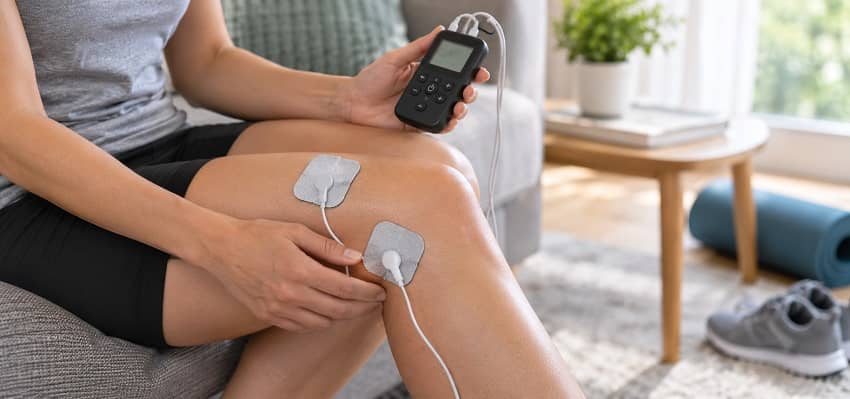
Start with the instructions for your exact device and use TENS only for a pain problem you understand. The NHS and Cleveland Clinic advise placing pads on clean, intact skin near the painful area, increasing intensity only to a strong but comfortable sensation, and avoiding unsafe locations or situations such as driving, bathing or sleeping with the unit running.
- Know what you are treating. If the cause of the pain is new, severe, unexplained or changing, get medical advice instead of using TENS to mask it.
- Read the exact placement guide. Use the manufacturer’s electrode map and any instructions your clinician has given you.
- Apply pads to clean, dry, intact skin. Do not place them on broken, infected, irritated or numb skin.
- Start low and increase gradually. The sensation should be strong but comfortable, not painful. Stop if stimulation causes pain, significant skin irritation, dizziness or other concerning symptoms.
- Turn the unit off before moving pads. Follow the device timer and do not use it while driving, operating tools, bathing, showering or sleeping.
Who should check with a clinician before using TENS?
Do not use a TENS unit without professional guidance if you have a pacemaker or another implanted electrical device. The NHS also advises people with epilepsy not to use TENS and advises against use during pregnancy unless a doctor or midwife says it is appropriate. Cleveland Clinic lists additional conditions that may require medical advice, including some heart, clotting, bleeding and cancer-related situations.
Do not place TENS electrodes on the front or side of the neck, head, eyes, mouth, broken or numb skin, or in a configuration that sends current across the chest. Follow your device manual because contraindications can vary by model.
When should you see a healthcare professional instead?
TENS should not be used to delay assessment of new, severe, worsening or unexplained pain, especially after an injury or when pain comes with weakness, numbness, loss of function, fever, chest symptoms or other concerning changes. A clinician can help identify the cause of pain and decide whether TENS belongs in the treatment plan at all.
If TENS repeatedly irritates your skin, causes unpleasant sensations even at low settings, stops helping, or you are unsure where pads can safely be placed, stop and ask a qualified healthcare professional for guidance.
Frequently asked questions
What is a TENS unit?
A TENS unit is a transcutaneous electrical nerve stimulation device. It sends low-voltage electrical pulses through electrodes placed on the skin. Some people use TENS as a non-drug option for temporary pain relief. It does not diagnose the cause of pain or repair an injury, and the amount of relief varies from person to person.
What is the difference between TENS and EMS?
TENS is primarily used to stimulate sensory nerves for pain modulation, while EMS or NMES is designed to produce muscle contractions for muscle activation or rehabilitation. Some consumer devices combine both functions. If a clinician prescribed electrical stimulation for a specific purpose, confirm whether they meant TENS, EMS/NMES or another modality before buying a device.
How strong should a TENS unit feel?
Clinical guidance commonly describes effective TENS as a strong but comfortable tingling sensation. More intensity is not automatically better, and stimulation should not hurt. Begin at a low level and increase gradually according to your device instructions. If you develop pain, burning, marked irritation or other concerning symptoms, stop the session.
Where should you not put TENS pads?
Avoid the front or side of the neck, head, eyes, mouth, broken or infected skin, numb areas and arrangements that send current across the chest. Do not improvise pad placement from a generic internet diagram when your device manual gives specific instructions. Ask a clinician if the painful area is close to a contraindicated location.
Can you use a TENS unit with a pacemaker?
Do not use TENS without medical clearance if you have a pacemaker or another implanted electrical device. Electrical stimulation can interfere with some implanted devices, and safe use depends on the device, placement and clinical circumstances. Contact the clinician who manages the implant rather than relying on a consumer TENS product listing.
Can you use a TENS unit every day?
Some people use TENS repeatedly, but the right schedule depends on the device, skin response, pain condition and clinician guidance. Follow the session limits in your exact manual, rotate or inspect pad sites as instructed, and stop if skin irritation develops. More frequent use does not guarantee better or longer-lasting pain relief.
Does a TENS unit cure chronic pain?
No. TENS is a symptom-management tool, not a cure for the underlying cause of chronic pain. Research suggests it can reduce pain during or shortly after use for some people, but results vary and condition-specific evidence remains uncertain. Persistent pain still deserves an appropriate diagnosis and a broader treatment or rehabilitation plan.
This article is for general information only and is not medical advice. Talk to a qualified healthcare professional about your specific pain, diagnosis, medications, implanted devices and whether TENS is appropriate for you.